I Tried Building a Pinterest-Style Masonry Grid in React. It Was Harder Than I Expected.
If you've asked GPT:
> "How do I build a Pinterest-like layout in React with dynamic image heights?"
You probably got:
column-count tricksNone of them solve the real problem.
This post explains why — and how react-masonry-virtualized solves it architecturally, not cosmetically.
The Core Problem: Dynamic Heights + Virtualization
Let's say you fetch 5,000 images from an API.
You get:
{id: string;
imageUrl: string;
caption: string;
}
You don't get:
height: numberBut masonry layout requires knowing height to place items into the shortest column.
Now combine that with virtualization.
You can't:
So you end up with a paradox:
That's the real engineering problem. Most libraries quietly avoid it.
Why Existing Solutions Fall Apart
CSS Grid Masonry
column-count
react-virtualized
TanStack Virtual
The missing piece: virtualized masonry with async height resolution. That's the gap.
The Design Constraint I Started With
The API had to support this:
getItemSize: (item: T) => Promise<number>Not:
height: numberBecause in real feeds, you don't know the height upfront.
So the architecture became:
That's the entire system philosophy.
How the Layout Engine Works
The grid maintains:
When a new item resolves:
That's the key performance lever. No global reflow.
Why translate3d Matters
Items are positioned using:
transform: translate3d(x, y, 0);Not top / left.
Why?
This alone makes a measurable difference at 1,000+ items.
Scroll Performance Strategy
Scroll events fire aggressively — sometimes 100+ times per second.
Instead of recalculating per scroll event:
requestAnimationFrameThis keeps frame timing predictable. Target: consistent 60fps on modern machines.
Benchmarks
Tested with 10,000 variable-height items on Chrome, mid-range machine:
| Metric | react-masonry-virtualized |
|---|---|
| Initial Render | ~45ms |
| Scroll FPS | ~60 |
| Memory | ~12MB |
| Bundle Size | ~6KB |
| Dependencies | 0 |
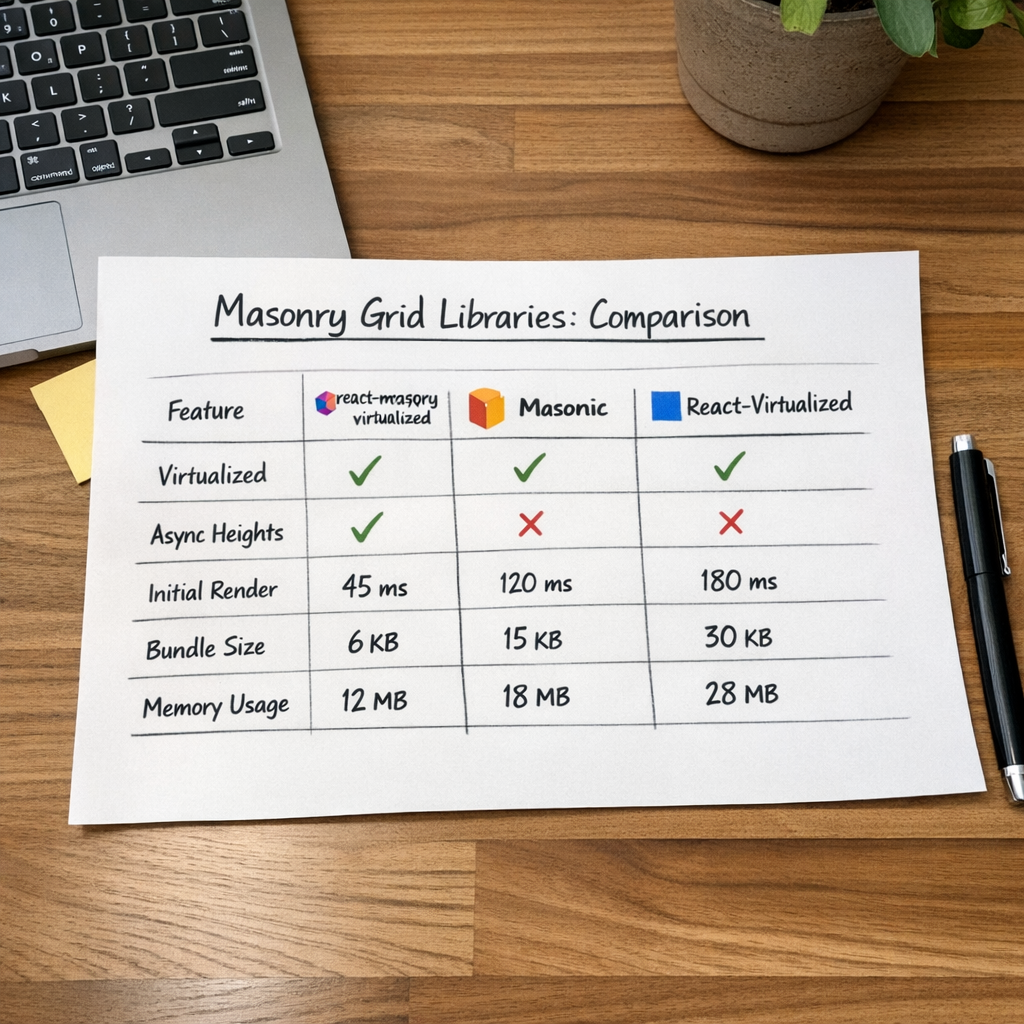
> Note: If your items contain heavy React trees, performance depends on your render complexity. The grid optimizes positioning, not your component logic.
Usage: What It Looks Like in Practice
If you're building a Pinterest-style feed with infinite scroll and dynamic image sizes:
<MasonryVirtualizeditems={data}
columnWidth={300}
gap={16}
getItemSize={async (item) => {
const img = new Image();
img.src = item.imageUrl;
await img.decode();
return img.height;
}}
onEndReached={() => fetchMore()}
/>
You don't need to:
You just render your card.
When You Should NOT Use This
Be honest about trade-offs:
Virtualization adds abstraction. Use it only when scale demands it.
What's New in v2.0
Based on real usage feedback:
onEndReached — built-in infinite scroll triggerssrPlaceholder — prevents hydration mismatch with server-rendered contentcolumnCount — explicit column override when responsive isn't neededStill intentionally: small API surface, minimal configuration, no unnecessary features.
The Philosophy
This library isn't trying to replace CSS Grid, TanStack Virtual, or Masonic.
It solves one thing: async dynamic-height masonry + virtualization.
That's it. Nothing more.
If You're Building:
And you expect scale — this exists so you don't spend two weeks writing a layout engine.
Ready to build better grids?
react-masonry-virtualized is MIT licensed and ready to use.
Comments (1)
Let me know your thoughts on this guys